Namirial Notify tracks each communication or signature workflow through states and events, and typically assigns a final outcome when the process closes.
Understanding the difference between states, outcomes, and events helps you interpret transaction history, recipient actions, and affidavits correctly.
This page provides representative lifecycle terminology used across Namirial Notify services. Exact labels and transitions can vary by service, interface, API, and configuration.
For affidavit-generation rules and affidavit kinds, see Evidence and affidavits.
- A state shows the current phase of the process.
- An event records something that happened during the process.
- An outcome shows the final result once the process is complete.
- An affidavit kind names the type of affidavit that certifies a specific event or summary and does not always match the state or outcome label.
In practice:
- states tell you where the transaction is
- events tell you what happened
- outcomes tell you how it ended
When you query a transaction, three kinds of fields tell you what has happened. Understanding how each behaves over time is essential if you reconcile status by polling instead of callbacks.
Stateis updated as the transaction progresses.Failedrecords a recoverable processing or delivery failure; the platform may retry or advance to a later state.Closedis the final stage of the state machine and does not change afterwards.Outcomegenerally remainsNonewhile the transaction is active. When the state becomesClosed, the platform derives the final outcome from the milestones recorded during the transaction. The outcome is then fixed.Outcome: Failedis the final result when a failure was recorded and takes priority over successful milestones.
Do not treat State: Failed as a permanent failure or resubmit immediately. Wait for Closed and inspect the final Outcome; permanent failure is represented by Outcome: Failed.
Events can arrive close together or out of order. When the transaction closes and more than one outcome-like milestone has been recorded, Namirial Notify derives the final outcome by priority instead of only using arrival order.
For EviNotice, the effective priority is: Failed, Rejected, Accepted, Refused, Read, Received, Delivered, Sent, Certified, then None.
For EviMail, the effective priority is: Failed, Rejected, Accepted, Read, Delivered, Sent, Certified, then None.
For EviSMS, the effective priority is: Failed, Read, Delivered, Sent, Certified, then None.
This means a recorded higher-priority milestone can prevent a lower-priority milestone from becoming the final outcome, regardless of event arrival order. For example, a rejected notice remains rejected even if another technical event is recorded around the same time.
Each lifecycle milestone has a corresponding timestamp field (for example NewOn, ReadyOn, SentOn, DeliveredOn, ReadOn). A timestamp is set only if and when the platform records that milestone. If a milestone was not recorded, its timestamp is null or absent.
This makes timestamps the most reliable way to determine which milestones were recorded — even after a transaction has closed. To check whether a message was delivered, for example, check whether DeliveredOn has a value rather than relying on the current State or Outcome.
The fields available depend on the service:
| Timestamp field | Meaning | EviNotice | EviMail | EviSMS |
|---|---|---|---|---|
NewOn / SubmittedOn | The submission was admitted and certification began. EviMail and EviSMS use NewOn; EviNotice uses SubmittedOn. | ✅ | ✅ | ✅ |
ReadyOn / ProcessedOn | Initial processing and content certification finished; the communication is ready to send. EviMail and EviSMS use ReadyOn; EviNotice uses ProcessedOn. | ✅ | ✅ | ✅ |
DispatchedOn | The communication was handed to the sending process or delivery channel. It has not yet been accepted by the remote system. | ✅ | ✅ | ✅ |
SentOn | Transmission was accepted by the remote system. For EviNotice, this applies to the notification sent by email, SMS, RCS, or WhatsApp, not to the hosted content. For EviMail, the recipient's mail server accepted the email; for EviSMS, the operator accepted the SMS or RCS message for routing. | ✅ | ✅ | ✅ |
DeliveredOn | Delivery to the recipient was confirmed (see the service-specific caveats below). | ✅ | ✅ | ✅ |
ReceivedOn | The recipient followed the notification link and reached the hosted notice flow before opening the content. EviNotice only. | ✅ | — | — |
ReadOn | The recipient opened or read the content (see the service-specific caveats below). For EviSMS, set only for rich-channel (RCS) deliveries; plain SMS has no read receipt. | ✅ | ✅ | ✅ |
RefusedOn | The recipient explicitly refused the notice before reading it, when that feature is enabled. | ✅ | — | — |
AcceptedOn / RejectedOn | The recipient explicitly accepted or rejected the communication, when commitment is enabled. | ✅ | ✅ | — |
ExpiredOn | The lifecycle closed and tracking ended. This commonly occurs when the time-to-live elapses, but some flows close earlier after a recipient action or another finalizing event. | ✅ | ✅ | ✅ |
Acceptance — which field to use
The term "acceptance" can refer to different milestones:
- Processing and certification by Namirial Notify: use
ReadyOn, orProcessedOnfor EviNotice. - Handoff to the sending process or delivery channel: use
DispatchedOn. - Acceptance by the recipient's mail server or operator: use
SentOn.
Timestamp ordering
DispatchedOn is recorded when the message is handed to the sending process — at processing time — so it typically matches ProcessedOn (or ReadyOn) to the second and precedes SentOn, which is only set once transmission is confirmed. The normal logical order is: SubmittedOn/NewOn → ProcessedOn/ReadyOn → DispatchedOn → SentOn → DeliveredOn → ReceivedOn → ReadOn.
Not every milestone is guaranteed to produce a timestamp. For example, a recipient can follow a notification link even if the recipient's mail infrastructure did not report delivery, so ReceivedOn or ReadOn can be present while DeliveredOn is absent. Timestamps recorded within the same second come from independent processing steps and do not provide a deterministic order.
Delivery and read timestamps depend on the signals available for the service and channel. They can therefore be absent even when the communication reached the recipient.
The meaning of each timestamp is consistent across providers for a given channel. What can vary is signal availability: some providers report a delivery or read event while others do not. A missing timestamp means that the platform did not receive the corresponding signal, not that the field has a different provider-specific meaning.
EviNotice
DeliveredOnis set from best-effort delivery signals reported by the recipient's mail infrastructure. These depend on the recipient's server and client configuration, which may block them, soDeliveredOncan be absent even when the notification email was delivered.ReceivedOnis set when the recipient clicks the notification link and reaches the hosted notice.ReadOnis set after the recipient completes any required identification or validation step and is shown the actual content. In the normal hosted-notice flow,ReceivedOnprecedesReadOn, but treat them as independently recorded milestones.
EviMail
DeliveredOnis set when the platform receives a Delivery Status Notification (DSN) from the recipient's mail server. Many mail servers do not send a DSN, so a missingDeliveredOndoes not mean the message was not delivered.ReadOnis set when the platform records a supported signal that the message was opened or read. The available signals depend on the recipient's mail client and how the content is accessed, soReadOnis best-effort and may remain absent.
EviSMS
SentOnis set when the telco operator accepts the message for routing, confirmed by a GSM/SMPP delivery receipt (DLR).DeliveredOnis set when a DLR confirms delivery to the recipient's terminal.ReadOnis set only for rich-channel (RCS) deliveries that report a read event. Plain SMS has no read receipt, soReadOnstays absent for SMS-only delivery.
Because delivery and read milestones rely on independent signals, you can see ReadOn set while DeliveredOn is absent. This is expected: an open or read was recorded even though no delivery notification was received. A user may also have several mail clients open at once, and which one reports first can change the signals received.
When a transaction reaches a state and its timestamp is set, the corresponding affidavit can take a few seconds or minutes to become available, because affidavits are generated asynchronously. A state timestamp can therefore be present before its affidavit is published. Affidavits for a transaction are expected to be available by the time it reaches Closed.
The presence of a transmission-result affidavit does not by itself confirm delivery. The same affidavit kind is generated whether or not delivery succeeded — the actual result is recorded in the state timestamps and the event history, not in the affidavit kind. Use DeliveredOn (and the per-event details) to determine the delivery result.
States describe the progression of a transaction from creation to closure.
Certified delivery services, including EviNotice, EviMail, and EviSMS, typically use the following states:
- Draft — the communication is saved but not yet sent.
- New or Submitted — the communication was admitted for certification and is waiting to be processed.
- Ready or Processed — the communication was processed and is ready to be sent.
- Dispatched — the platform completed its checks and accepted responsibility for the communication; it is not yet sent.
- Sent — transmission was confirmed by the remote system (for example, the recipient's mail server or the telco operator).
Dispatchedalways precedesSent. - Delivered — the communication or notification reached the recipient.
- Received — for hosted-notice flows such as EviNotice, the recipient followed the notice link and reached the hosted notice flow before opening the content.
- Read — the recipient opened the content, where this milestone is supported and exposed as a status.
- Replied — for EviNotice, the recipient accepted or rejected the notice. Refusal closes the evidence with a
Refusedoutcome instead of usingReplied. - Closed — tracking is complete and no further status changes are expected.
- Failed — a recoverable processing or delivery failure occurred. The platform may retry or advance to a later state.
Status names can vary slightly by service, screen, or API. For example, some views show Ready, while others show Processed; some use Sent, while others also show Dispatched.
The following diagrams show the normal evidence lifecycle for certified delivery services. They focus on persisted evidence states and final outcomes. Event-history screenshots are shown separately in the Events section.
Event timeline examples from transaction history:
- EviNotice event timeline:

- EviMail event timeline:

- EviSMS event timeline:

EviSign uses states such as:
- Draft — the signature request is prepared and can still be edited.
- Submitted — the request was admitted for processing.
- Processed — the content was certified and the signing workflow was prepared.
- Sent — signature requests were sent to recipients.
- Closed — the signature process reached its end.
Some source-defined EviSign states, such as Forwarded and Received, may appear in specific or legacy flows. The simplified lifecycle diagram focuses on the main source-backed progression used for documentation.
The following diagrams separate the overall EviSign evidence lifecycle from the per-signer or per-party lifecycle.
EviSign event timeline:

EviPost uses states such as:
- Draft — the postal communication is saved but not yet sent.
- Submitted — the communication was admitted for postal processing.
- Processed — the communication was processed and prepared for dispatch.
- Dispatched — the request entered the postal workflow.
- Sent — the communication was handed to the postal operator.
- Delivered — the postal process reached the delivery stage, where this status is exposed.
- Closed — the postal process completed and no further tracking is expected.
Some interfaces may also show Issued as an intermediate status.
EviPost uses postal result states that depend on the service type, configuration, and operator reports. A delivery-attempt event does not itself set Undelivered. That state records reported non-delivery but is not closure. For Registered and Letter with delivery tracking enabled, the platform accepts a later valid delivery report while tracking remains open; the operator sequence is unconfirmed. LetterLite cannot complete normal closure with Delivered once non-delivery has been recorded. A configured Letter disposal workflow can continue to Disposed. For Letter, a later failure report can move Undelivered to Failed before closure. Use the outcome at Closed as the final result.
Undelivered alone does not say whether an item is awaiting collection or being returned. Review the operator details in the event history or available affidavits. See Delivery attempts and non-delivery.
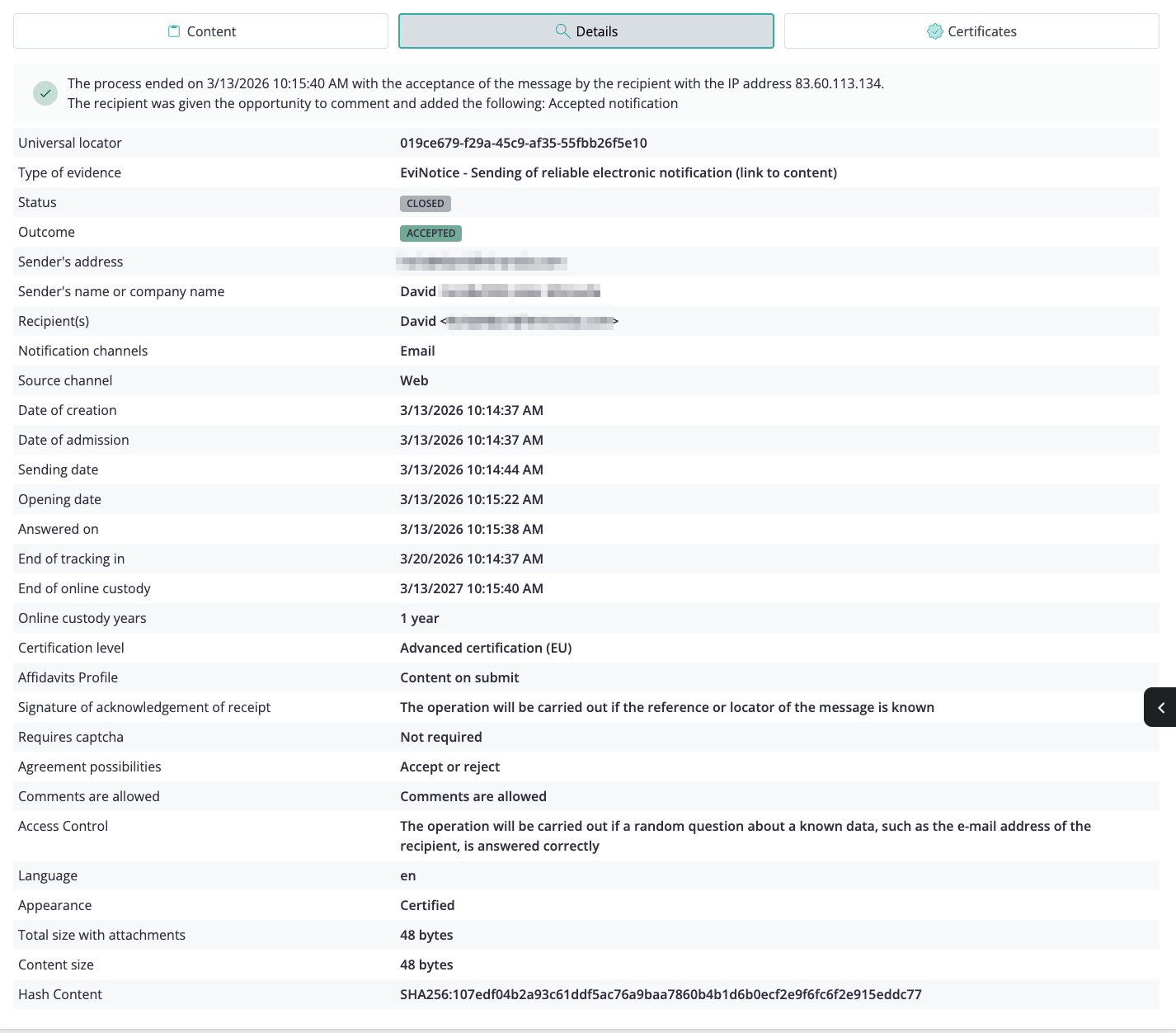
Outcomes describe the final result of a transaction. The outcome usually starts as None and becomes final when the process reaches Closed.
For services such as EviNotice, EviMail, and EviSMS, common outcomes can include:
- None — the process is still open and no final result exists yet.
- Certified — the content was certified, but the final delivery result is not yet confirmed.
- Sent — the communication was sent, but no later recipient event was confirmed.
- Delivered — the communication reached the recipient’s inbox, device, or access channel.
- Received — in hosted-notice flows such as EviNotice, the recipient reached the notice flow before reading the content.
- Read — the recipient opened the communication, where supported.
- Accepted — the recipient explicitly accepted the communication.
- Rejected — the recipient explicitly rejected the communication.
- Refused — in services that support explicit refusal before opening or reading, the recipient refused the communication.
- Failed — the process could not be completed because of an error.
Terminology note
- Outcome labels can vary by service or interface. For example, some contexts use
Rejected, while others useDeclinedfor refusal-like outcomes. - Some interfaces display the final field as
Resultinstead ofOutcome, while keeping the same interpretation. - Affidavit labels can use different names from outcomes — for example
CommittedorRefused— because affidavits certify specific events rather than final lifecycle status names.
For EviSign, common outcomes include:
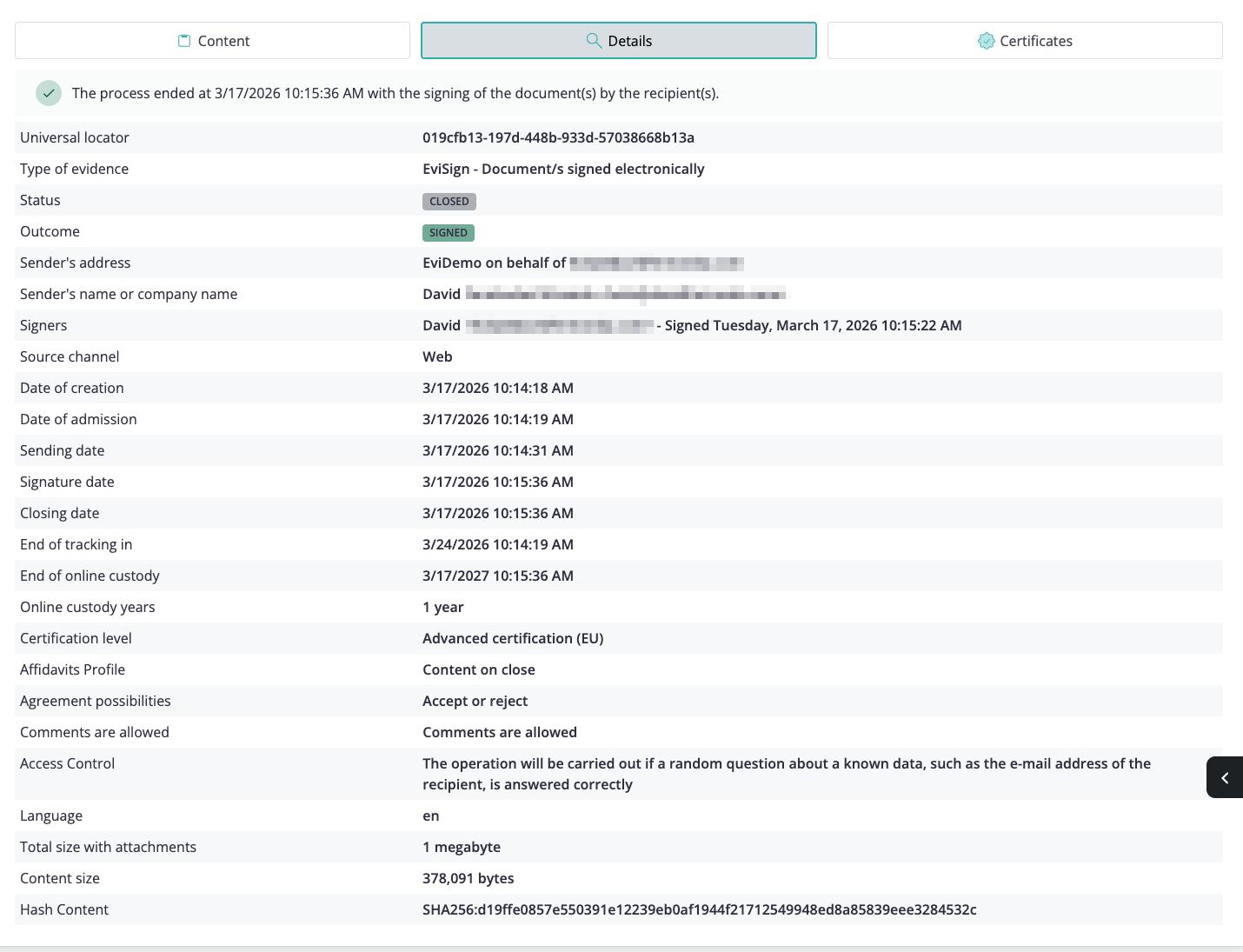
- None — the signature process is still open.
- Signed — all required signatures were completed.
- Rejected — a signer rejected the document or workflow.
- Expired — the signing time limit was exceeded.
- Cancelled — the issuer cancelled the signature request.
- Failed — an error prevented normal completion.
Terminology note
- In signature workflows, Rejected usually means an explicit refusal action on the document or process.
Declined, where shown by specific interfaces, can indicate a withdrawal or a refusal path that differs from a standard rejection action.- Some EviSign screens display
Resultfor the final value — for exampleSigned— instead ofOutcome.
For EviPost, common outcomes include:
- None — no outcome has been assigned yet. Other outcomes can also appear while the postal process remains open.
- Delivered — the postal communication was successfully delivered.
- Rejected — the recipient rejected the postal communication.
- Cancelled — the issuer cancelled the request.
- Expired — delivery could not be completed within the service limits.
- Undelivered — the operator reported non-delivery; treat it as final only at closure.
- Disposed — the provider reported destruction of the undelivered item under a configured disposal service.
- Failed — an error prevented normal postal completion.
Terminology note The current postal event handlers report recipient refusal as Rejected. Declined remains defined in the API contract and domain but is not emitted by those handlers. Other non-delivery outcomes such as Undelivered or Disposed may also appear depending on what the postal operator reports.
Events are recorded facts that occur during the process. Not every event changes the state, but events provide the detailed history used to understand what happened and, in some cases, to generate affidavits.
This section uses representative event names for interpretation. Service-specific and affidavit-specific taxonomies can differ by configuration and are documented in:
For services such as EviNotice, EviMail, and EviSMS, representative event names can include:
- New — the communication was admitted for certification.
- Certified — the content was certified and prepared for sending.
- Retry — a temporary issue occurred and the system will try again.
- Submitted — the communication was submitted to the sending flow.
- Dispatched — the communication has left the initial preparation phase and has been handed to the service-specific sending process. The exact meaning depends on the service. For EviMail,
Dispatchedoccurs beforeSent; it means sending has been requested and the message is ready for the sender component. - Sent — the recipient's server, operator, or delivery channel accepted the transmission.
- Delivered — the communication or notification reached the recipient.
- Received — in hosted-notice flows, the recipient reached the notice flow before opening the content.
- Read — the recipient opened the communication, where supported.
- Accepted — the recipient accepted the communication.
- Rejected — the recipient rejected the communication.
- Refused — the recipient explicitly refused the communication before opening or reading it, where that path is supported.
- Delayed — a delivery-status notification reported a temporary delivery delay.
- Relayed — a delivery-status notification reported that the message was relayed through another system.
- Expanded — a delivery-status notification reported that a distribution list or alias expanded the message to additional recipients.
- Failed — a failure event or failed attempt occurred. Some services may retry and later close with a final outcome. For EviMail, wait for
Closedwith a finalOutcomebefore treating the communication as permanently failed. - Expired — the tracking period ended.
Not every service exposes every event name in the same way. Technical DSN events such as Delayed, Relayed, and Expanded help explain email delivery processing and do not necessarily mean the final outcome has changed. Treat these names as interpretation anchors, then verify the exact labels shown in the transaction timeline.
For EviSign, representative events include:
- Submitted — the document was admitted for processing.
- Processed — the document was certified and the signing workflow was prepared.
- Sent — the signature request was sent.
- FullySent — the request was sent to all signers.
- Delivered — a signer received the request.
- FullyDelivered — all signers received the request.
- Signed — a signer completed the signature.
- Rejected — the signer rejected the document or signature request.
- Declined — a signer withdrew from the process.
- Cancelled — the issuer cancelled the workflow.
- Expired — the signing time limit was exceeded.
- Closed — the signing process completed.
Depending on configuration, signer-level and workflow-level labels can both appear in history.
Delivery attempts are events, not separate high-level states. An event can therefore be added without a state change. Not every postal event has a corresponding API callback filter.
For EviPost, the event history can include steps such as:
- admission of the postal communication
- processing and certification of the content
- printing of the document
- enveloping or packaging
- dispatch to the postal operator
- delivery attempt or delivery failure
- delivery confirmation
- recipient refusal, where reported
- closure of the postal process
Postal event granularity depends on the selected service type, its configuration, and what the postal operator reports back.
- Check the state to understand the current phase of the transaction.
- Review the events to see what happened during the process.
- Check the outcome once the process is closed to confirm the final result.
- Use the outcome and event history together when interpreting affidavits.