The following system requirements are recommended for a SignBox deployment:
- CPU: Modern multicore processor (minimum 4 cores)
- RAM: 8 GB
- Disk space: 200 GB
- Operating system: Linux
SignBox is distributed as a Docker image and deployed using Docker Compose. This approach simplifies installation, configuration, and maintenance. The commands below are suitable for Ubuntu-based systems; other Linux distributions may require their own package managers and commands.
Add Docker's official repository and install Docker along with Docker Compose:
# Add Docker's official GPG key
sudo apt-get update
sudo apt-get install ca-certificates curl
sudo install -m 0755 -d /etc/apt/keyrings
sudo curl -fsSL https://download.docker.com/linux/ubuntu/gpg -o /etc/apt/keyrings/docker.asc
sudo chmod a+r /etc/apt/keyrings/docker.asc

# Add the repository to Apt sources
echo \
  "deb [arch=$(dpkg --print-architecture) signed-by=/etc/apt/keyrings/docker.asc] https://download.docker.com/linux/ubuntu \
  $(. /etc/os-release && echo "$VERSION_CODENAME") stable" | \
  sudo tee /etc/apt/sources.list.d/docker.list > /dev/null

sudo apt-get update
sudo apt-get install docker-ce docker-ce-cli containerd.io docker-buildx-plugin docker-compose-plugin
sudo systemctl start docker
Run sudo docker run hello-world to verify the installation.
Extract all content from the optimizer_docker.zip archive into a local folder. Move the uanataca_optimizer folder (or the extracted content) to /opt on the server.
The resulting directory structure at /opt/optimizer_docker/ should look like:
optimizer_data(folder)docker-compose.ymlenvironmentuanatacaoptimizer.tar.gz
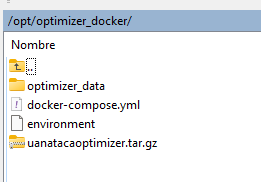
In high-performance environments with a pool of SignBox Optimizer instances, service settings and logs must be stored in a shared volume outside the Optimizer servers. Define these volumes in the docker-compose.yml file on each SignBox Optimizer host.
For single-instance deployments, the default volume configuration in the provided docker-compose.yml is sufficient.
From the optimizer directory, load the Docker image and remove the archive:
cd /opt/optimizer_docker/
docker image load -i uanatacaoptimizer.tar.gz
rm -rf /opt/optimizer_docker/uanatacaoptimizer.tar.gzStart the services in detached mode:
docker compose up -dCheck that all services are running:
docker compose psExpected output:
| NAME | IMAGE | PORTS |
|---|---|---|
| uanataca_optimizer_docker-optimizer-1 | uanatacaoptimizer:1.0 | 0.0.0.0:5678->5678/tcp, 0.0.0.0:16100->16100/tcp |
| uanataca_optimizer_docker-redis-1 | redis | 0.0.0.0:6379->6379/tcp |
All services must show status Up. For default ports and how to change them, see Ports.
- Configure network ports if you need to change the default port
- Configure the rootstore for LTV/LTVLITE signature levels
- Access service logs for troubleshooting