SignBox allows placing a visual signature inside the signed PDF document. The visual signature combines an optional image with customizable text that displays signer information from the certificate.
Use the signature_appearance parameter to define how the signature will look. You can also target specific PDF form fields using signature_ids.
| Parameter | Description | Example |
|---|---|---|
signature_appearance | JSON object that describes the visual appearance of the signature. | See Signature appearance object below |
signature_ids | Comma-separated list of PDF signature field IDs to sign. Use this when your PDF contains pre-defined signature form fields. | signature1,signature2 |
The signature_appearance object controls text content, positioning, images, date formatting, and layout. All properties are optional; configure only what you need.
{
  "text": [
    "Signed by: %(CN)s",
    "%(EMAIL)s %(L)s %(SUBJECT)s",
    "Date: %(DATE)s"
  ],
  "date": "%d/%m/%Y %H:%M:%S %z",
  "timezone": "America/Guatemala",
  "position": "30,100,165,150",
  "image": "be1cd133-8be5-4346-87de-d40afd90a3b9",
  "horizontal": true,
  "page": 0
}| Parameter | Description |
|---|---|
text | Array of text lines to display. Use variables to retrieve data from the signer certificate. Each array element is a separate line. |
date | Date format string. Supports strftime-style placeholders (e.g. %d/%m/%Y %H:%M:%S). |
timezone | Timezone for the signature date. Default is UTC. List available timezones with: timedatectl list-timezones |
position | Coordinates in points (pt) for signature placement and size: x1,y1,x2,y2. Origin is bottom-left of the page. 1px = 0.75pt. |
image | ID of a previously uploaded image to use as the signature graphic. |
b64_image | Image encoded in base64. Use this instead of image when you do not pre-upload the image. |
qrcode | URL used to generate a QR code in the signature block. |
horizontal | Boolean. When true, arranges image and text horizontally. |
page | Zero-based page index where the signature will be placed. First page is 0. |
text_size | Font size for the signature text. |
text_align | Horizontal alignment of the text (left, center, or right). |
reason | Human-readable reason for signing (e.g. "Contract approval"). |
location | Geographic location associated with the signature. |
The position parameter defines a rectangle using four values: x1,y1,x2,y2.
- Origin: Bottom-left corner of the page (0,0)
- x1, y1: Bottom-left corner of the signature area
- x2, y2: Top-right corner of the signature area
- Unit: Points (pt). Convert from pixels: 1px = 0.75pt
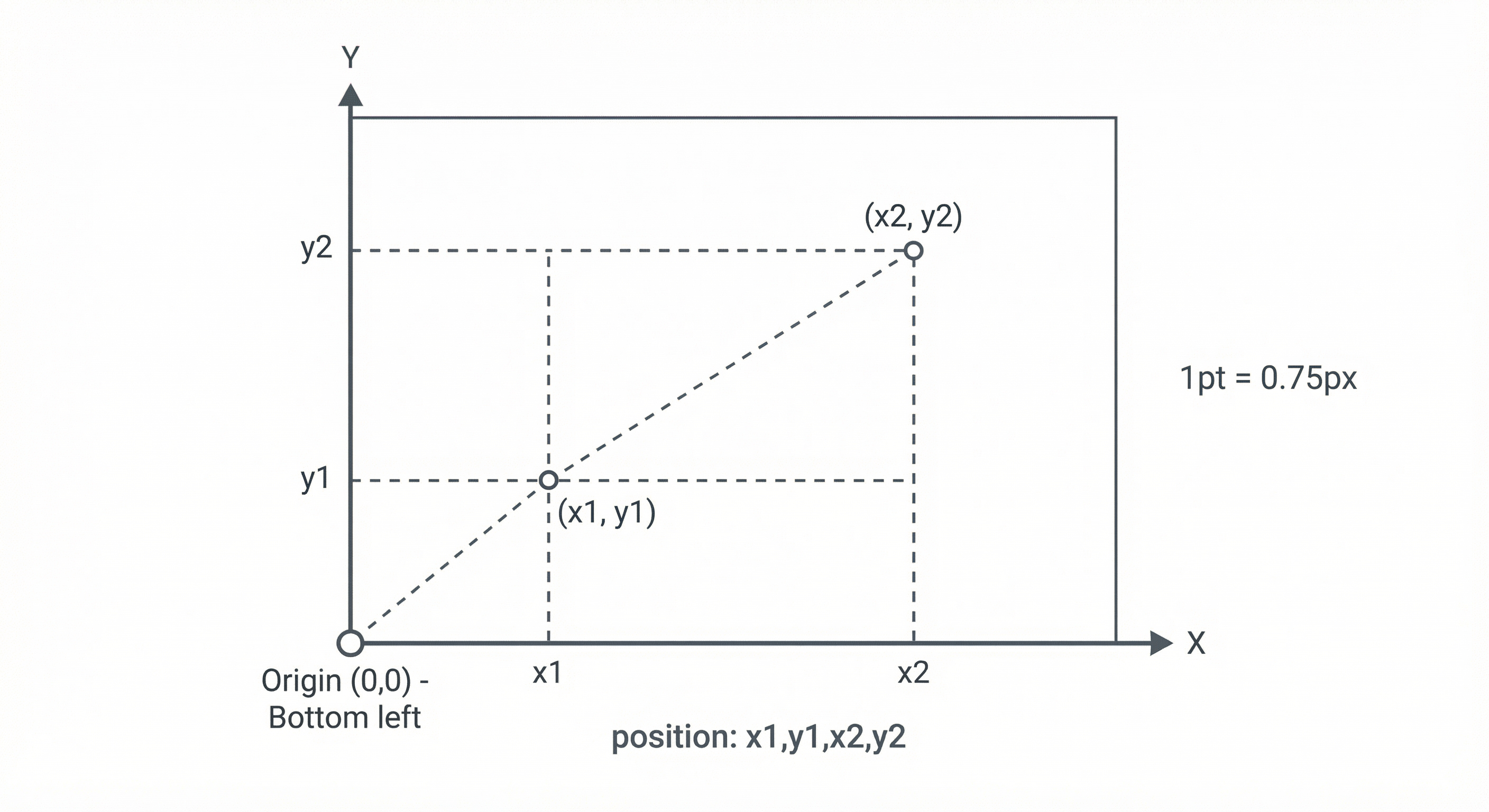
Example: "position": "30,100,165,150" places a signature 30pt from the left, 100pt from the bottom, with a width of 135pt and height of 50pt.
Use these placeholders in the text array to insert certificate and signature data dynamically.
| Variable | Description |
|---|---|
%(CN)s | Common Name from the signer certificate |
%(L)s | Locality |
%(S)s | State or Province Name |
%(OU)s | Organizational Unit Name |
%(E)s | Email address |
%(EMAIL)s | Email from Subject Alternative Name |
%(SUBJECT)s | Full certificate subject |
%(Issuer)s | Certificate issuer (CA) Common Name |
%(DATE)s | Signature date and time (formatted according to date and timezone) |
%(date)s | Signature date and time in ISO 8601 format |
Example text block:
"text": [
  "Signed by: %(CN)s",
  "%(EMAIL)s",
  "Date: %(DATE)s"
]You can include graphics in the visual signature in three ways:
- Pre-uploaded image (
image): Upload the image via the SignBox API first and reference it by ID. - Inline base64 (
b64_image): Provide the image data directly as a base64 string. - QR code (
qrcode): Provide a URL; SignBox generates a QR code linking to that URL.
- Signatures — Formats, levels, and configuration scope
- SignBox signing flow — How signing requests are processed
- SignBox API reference — Full API specification for signing operations