SmartCMS provides a powerful and user‑friendly web interface designed to manage the entire lifecycle of PKI credentials and security devices.
The interface is highly modular and configurable, allowing organizations to implement custom workflows, authentication mechanisms, certificate templates, and operational rules according to their internal policies. It can represent complex hierarchical structures and allows different roles to operate with the appropriate privileges within their assigned scope.
This section illustrates the core web functionalities available to administrators, registration officers, and operators.
The SmartCMS interface allows the management of:
- User registration
- Device personalization (smart cards, USB tokens)
- Certificate lifecycle operations
- Operator and office management
- Auditing and tracking
- Custom workflows and authorization procedures
- Predefined issuance flows
- Secret code assignments (PIN, PUK, emergency codes)
The web interface adapts to the operational profile of the authenticated user, ensuring clear separation of duties.
The homepage displays high‑level statistics relevant to system usage, such as:
- Number of active registration offices
- Number of registration officers
- Number of devices issued
- Pending or in‑progress requests
- Other KPIs customized per installation

These metrics can be tailored by the customer during deployment.
The Request Management section enables operators to track and process every request for digital certificates or devices.
The list displays, for each entry:
- Ordinal request number
- Registration office
- Holder name
- Device type
- Request status (approved, pending, produced, etc.)
- Registration date
- Production date
Operators can apply filters, sort results, and quickly locate requests.

Authorized users can initiate new requests by filling a structured data form that includes:
- Personal data of the subscriber
- Identification data collected face‑to‑face
- Information about the requested certificate and device
- Registration officer details
- Additional organization‑specific attributes

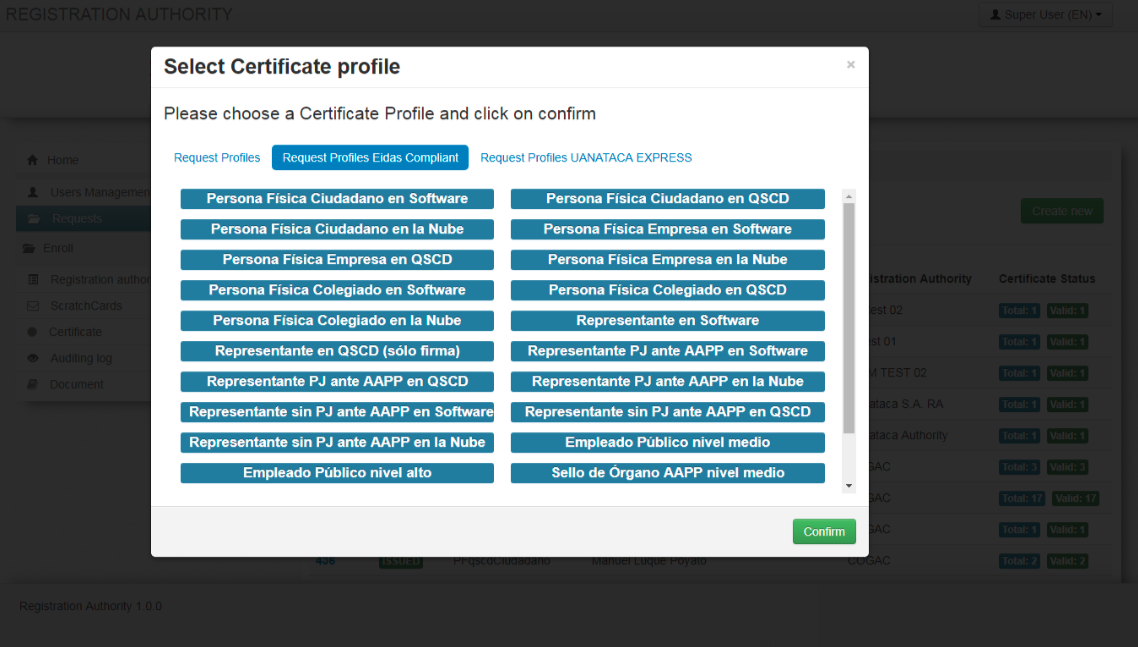
During registration, operators can select the certificate profile to assign to the user from the available templates (e.g., authentication certificate, signing certificate, qualified signature certificate).
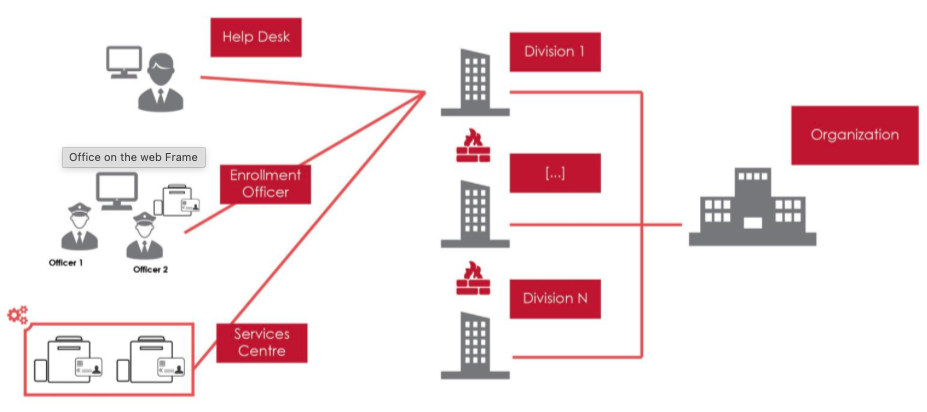
System administrators can configure:
- New organizations
- Divisions
- Registration offices
- Internal hierarchical structures (multi‑level)

Each office includes metadata such as:
- Number of operators
- Number of active or completed requests
- Organizational identifiers
- Assigned roles
- Optional geographic categorization
Filtering and searching by these attributes is natively supported.
SmartCMS supports fine‑grained role‑based access control.
Operators can be assigned to offices or divisions, each with specific permissions.
- Registration Officer (RO) — face‑to‑face identification, data entry, device delivery
- Delegated Officer (DO) — device personalization, certificate lifecycle operations
- Bureau Officer (BO) — centralized personalization workflows
- System Administrator (SA) — system configuration, DB connectivity, logging, maintenance
- Help Desk (HD) — lifecycle actions such as suspension/reactivation/revocation
- Audit Officer (AO) — access to audit logs
- Token Holder (TH) — end‑user accessing self‑service features
From the "Operators" section, administrators can:
- Add new operators
- Delete or deactivate existing operators
- Reactivate accounts
- Modify roles and permissions
- Assign or update organizational affiliations
- Import operators in batch via CSV files

This section provides an overview of all issued smart cards/tokens with:
- Serial number
- Holder name
- Device profile
- Status (active, suspended, revoked, expired)
- Production date
- Registration office of issuance
Lifecycle management shortcuts (suspend, reactivate, revoke) are available directly through this interface.
The interface exposes the complete SmartCMS functional ecosystem:
- Organization management
- Operators and permissions
- Device customization
- Personal data management
- Certificate lifecycle
- Secret codes lifecycle
- Auditing and log navigation
- Monitoring tools
- Self‑service portal integration
- API access management

The SmartCMS web interface is fully customizable during deployment:
- Custom forms for personal data
- Custom certificate profiles
- Custom workflows with multi‑step approvals
- Custom email notifications
- Custom dashboards and KPIs
- Custom data visibility rules for operators and offices
This ensures that SmartCMS can be adapted to:
- National identity systems
- Governmental PKI infrastructures
- Corporate digital signature systems
- Healthcare deployments
- Multi‑CA environments
- High‑security RA operations
The SmartCMS web interface provides:
- Comprehensive PKI device and certificate lifecycle management
- A clean, modular, and intuitive UI
- Flexible workflows and customization options
- Full support for hierarchical organizations
- Seamless integration with the UKC client and CA services
Its design makes SmartCMS suitable for both small organizations and large national‑scale ecosystems.