This guide explains how to set up the Verifiable Credential Issuance and Verifiable Credential Presentation using the API . In addition to logging in and creating an operator, this document shows how to set organizations, define credential and verification templates, and configure issuance and verification services.
To start testing API click the following link : API Technical reference
- A valid MyNamirial account.
- Basic familiarity with REST APIs.
To get started with the API an Organization API Operator is needed.
- Open the Namirial Wallet Studio login page.
- Sign in using your MyNamirial account credentials.
- Once logged in, you will be redirected to the dashboard.
API operators are accounts that interact with the API on behalf of an organization. To start using the API, an Operator with the Organization API role must be created.
- From the dashboard, open the Operators page.
- Select New Operator in the top right corner.
- Fill the form with the Operator informations. The
usernamemust be unique. - In the
Rolefield, selectOrganization APIand enable theAuto generate API tokenoption.
Once the Operator is created, the associated API key can be retrieved from the Operators page. This key will be required for accessing the API.
Note: Variables enclosed in curly braces, such as {customer_api_key}, denote environment variables. These must be properly defined in the execution environment with their corresponding values before invoking the API.
It is possible to test the API at the following link : API. To use the API correctly, after selecting a call and clicking “TRY IT”, look at the top right corner and make sure to switch the environment: do not use the mock server.
Using the API requires first creating an API Operator and retrieving the API key. To create a new operator with API call POST /api/v1/user/create/. The request body accepts many optional fields such as first_name, last_name, email, phone_number, etc., but the only required fields are username and role. You can also assign the operator to one or more organizations by providing a list of organization IDs in the organizations property.
When creating an Organization API or Service API operator you typically set the flag auto_generate_api_token to true so that the API returns an api_token for authentication.
From the API it is possible to create two types of operators:
Organization API (Role
5) – management operators who can create organizations, templates, services and other operators; this role is required to set up most resources.Service API (Role
6) – operators who can start issuance and verification flows (they call theinitendpoints).
curl -X POST {base_url}/api/v1/user/create/ \
  -H "Authorization: Bearer {customer_api_key}" \
  -H "Content-Type: application/json" \
  -d '{
    "username": "John_Doex",
    "role": 5,
    "customers": [1],
    "auto_generate_api_token": true
  }'
Note : To correctly invoke the API, you must specify the customer (i.e., organization) or the customers to which the operator should be associated. To identify the ID of a customer is possible to use the GET /api/v1/customer/
The credential issuance service requires at least:
- one credential template
- an issuance service associated with that template.
- a Service API operator
Performing the Issuance Service requires the API key of a Service API Operator. To create one, refer to the Create a new Operator section.
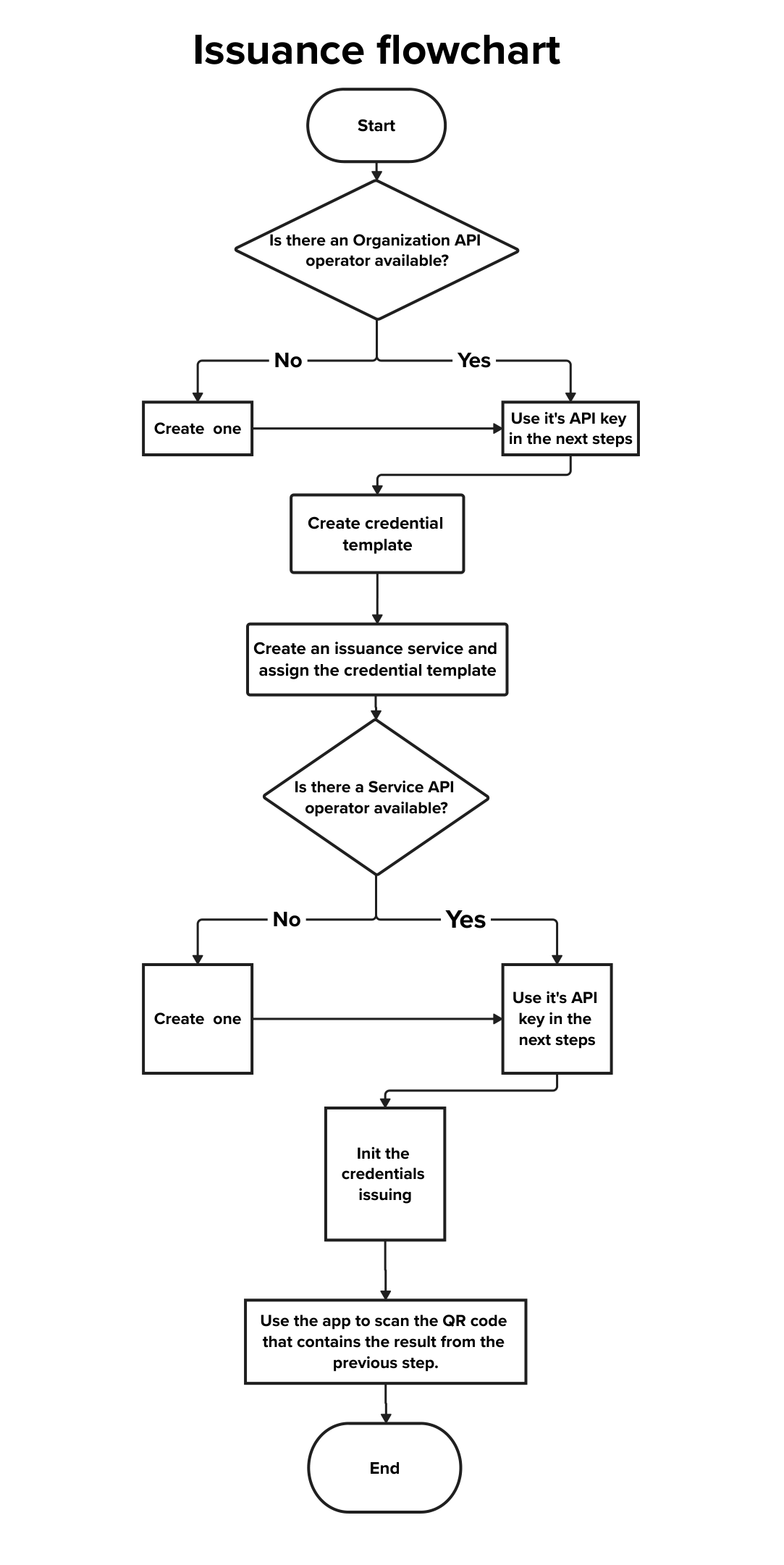
Credential templates describe the structure of the verifiable credential that is intended to be issued. They specify the credential’s format, type and schema. Use POST /credential/api/v1/template/create/ to create one. The required fields are:
name– a human‑readable title for the template.credential_format– eithersd_jwtormso_mdoc. SD‑JWT is a privacy‑preserving JSON Web Token, while MSO‑MDOC refers to mobile documents (ISO 18013‑7).credential_type– a machine‑readable type string (e.g.eu.europa.ec.eudi.pid.1).
You can optionally provide a schema object that mirrors the claim structure of your credential. Each property in the schema can be one of the following types in the format field: Integer number, Decimal number, Text, True/False, Date, Date and time, List, Object. A list can be of any of the defined types and an object can be used to define nested properties. Each property should also have a display name and a required boolean field. It may also have the unique boolean field.
- Required: Indicates whether the associated property is mandatory for an issuance service. When a credential template with a required property is used in an issuance service, the issuer must provide that property using data from the wallet user.
- Unique: Specifies that a credential with the same claim value for this property cannot be issued more than once by the same issuer. In other words, the issuer cannot issue multiple credentials with the same claim for this property.
curl -X POST {base_url}/credential/api/v1/template/create/   -H "Authorization: Bearer {customer_api_token}"   -H "Content-Type: application/json"   -d '{
    "name": "Personal Identifier Data",
    "credential_format": "sd_jwt",
    "credential_type": "eu.europa.ec.eudi.pid.1",
    "schema": {
      "anagraphical_data": {
        "display": "Personal data",
        "format": "dict",
        "properties": {
          "given_name": {"display": "Given name", "format": "str", "required": true},
          "family_name": {"display": "Family name", "format": "str", "required": true}
        },
        "required": true
      }
    }
  }'
The API returns an ID for the new template. This ID is needed when/or verification services.
An issuance service bundles one or more credential templates to be issued and defines which operators may issue credentials for a given organization. Create an issuance service using POST /issuance/api/v1/service/create/. Required fields include:
name– a descriptive name.customer– the ID of the organization for which the service is created.credential_templates– an array of credential template IDs linked to this service.users– a list of operators IDs allowed to use this service (user must have assigned the role: API Operator).
Optional fields:
status– service state;1for Enabled and2for Disabled (default).use_x5c– boolean flag indicating whether to include an X.509 certificate chain in issued credentials. Useful for offline verification.
curl -X POST {base_url}/issuance/api/v1/service/create/   -H "Authorization: Bearer {customer_api_token}"   -H "Content-Type: application/json"   -d '{
    "name": "Employee ID Issuance",
    "customer": 1,
    "credential_templates": [10],
    "users": [42, 43],
    "status": 1
  }'
It is possible to check the IDs of the desired credential templates using the following API GET /credential/api/v1/template/. For the User ID, the following API can be used GET /api/v1/user/
To issue a credential, call POST /issuance/api/v1/{issuance_service_id}/init. The payload includes optional callback_url and state values, and a credentials array where each item specifies a template_id and the claims to embed. You may also request a transaction code (tx_code) and specify recipients for the code. The API responds with a presentation request URI (for the wallet) and the transaction code if enabled. The presentation of the URI as a scannable QR is up to the organization.
curl -X POST '{base_url}/issuance/api/v1/{issuance_service_id}/init' \
'{
  "credentials": [
    {
      "claims": {
        "anagraphical_data": {
          "family_name": "Rossi",
          "given_name": "Gennaro"
        }
      },
      "template_id": 16
    }
  ],
  "tx_code": false,
  "callback_url": "https://...",
  "state": "123456"
}'
Please note:
- The only operators who can issue credential/s through this endpoint, are Service API operators.
- To call the API correctly is necessary to replace
{issuance_service_id}/with an existing issuance service ID. To retrieve all created issuance services, the following API can be usedGET /issuance/api/v1/service/
In order to verificate credentials, a verification template and a verification service are needed.
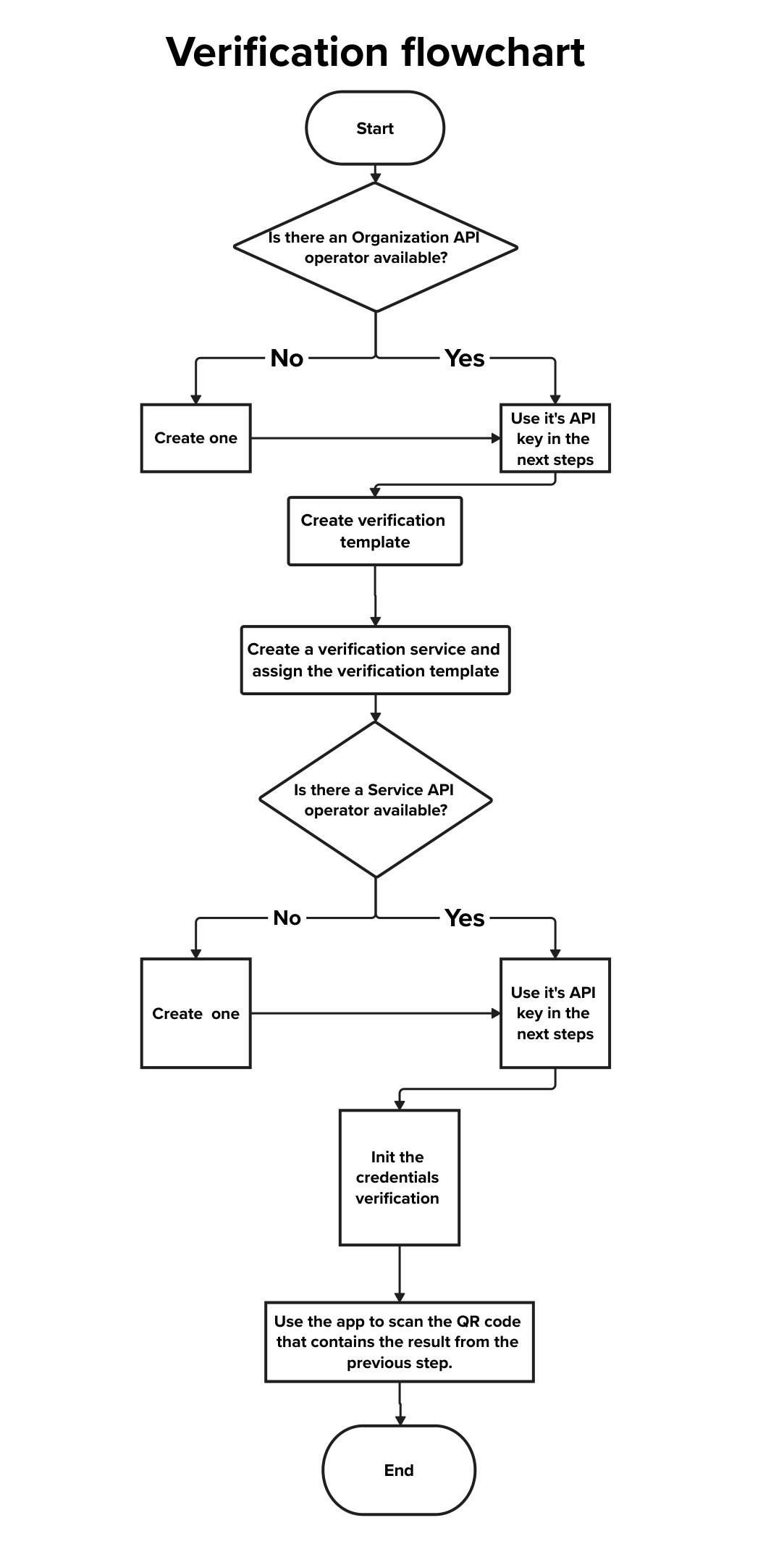
A verification template defines which claims a verifier is interested in. It references an already created credential template, and it is optionally possible to set rules defining which properties are mandatory and which are optional to complete the presentation request. Use POST /credential/api/v1/verification/template/create/. The required fields are:
name– the name of the verification template.credential_template– the ID of the credential template to verify.
You can provide a schema describing the requested attributes and whether they are required or optional. If omitted, the verification will expect all attributes defined in the credential template.
curl -X POST {base_url}/credential/api/v1/verification/template/create/   -H "Authorization: Bearer {customer_api_token}"   -H "Content-Type: application/json"   -d '{
    "name": "Verify Personal Data",
    "credential_template": 10,
    "schema": {
      "anagraphical_data": {
        "display": "Personal data",
        "format": "dict",
        "properties": {
          "given_name": {"display": "Given name", "format": "str", "required": true},
          "family_name": {"display": "Family name", "format": "str", "required": true}
        }
      }
    }
}'A verification service bundles one or more verification templates and defines how wallets should present credentials. Create one via POST /verification/api/v1/service/create/. Required fields are:
name– the service name.verification_templates– an array of verification template IDs.customer– the ID of the organization that owns the service.
Optional fields include:
users– operator IDs allowed to initiate verifications.status–1to enable the service,2to disable (default).request_mode– how the credential holder should create the presentation. Supported values arePEXandDCQL(Presentation Exchange or Digital Credential Query Language).response_mode– how the wallet returns the credential: eitherdirect_post(signed) ordirect_post.jwt(signed and encrypted)use_x5c– whether to include the certificate chain in the verification response.
curl -X POST {base_url}/verification/api/v1/service/create/   -H "Authorization: Bearer {customer_api_token}"   -H "Content-Type: application/json"   -d '{
    "name": "Verify Employee Identity",
    "verification_templates": [20],
    "customer": 1,
    "users": [42],
    "status": 1,
    "request_mode": "PEX",
    "response_mode": "direct_post.jwt"
}'To request a presentation, call POST /verification/api/v1/{verification_service_id}/init with a payload containing a callback_url, state, and a verifications array. Each element in verifications references a verification template and may include an optional tx_code flag. The API responds with a presentation request URI and (if requested) a transaction code.
curl -X POST {{baseUrl}}/verification/api/v1/86/init -H "Authorization: Bearer {customer_api_token}"   -H "Content-Type: application/json"   -d '{
  "verifications": [
    {
      "template_id": 128
    },
    {
      "template_id": 125
    }
  ]
}'
It is possible to set up multiple credential presentations, as shown in the example above. Please note: The only operators who can invoke this API to verify credentials through this endpoint, are Service API operators.
An organization groups services and operators. In the API it is referred to as a customer. Use POST /api/v1/customer/create/ to register a new organization. Each organization can have multiple sub-organizations.
The request body requires two fields:
name– the organization name.status– the organization’s status; use1for Enabled and2for Disabled.parent- link the new organization to a parent organization, allowing hierarchical structures, as shown below.

curl -X POST {base_url}/api/v1/customer/create/   -H "Authorization: Bearer {customer_api_token}"   -H "Content-Type: application/json"   -d '{
    "name": "Example Corp",
    "status": 1,
    "parent" : 3,
  }'
The response will return the new organization’s ID. You will need this ID to create templates and services.
- Authentication – All API calls must include an
Authorizationheader with a Bearer token obtained from the operator’sapi_token. - Status values – Organizations and services use integer status codes:
1for Enabled and2for Disabled. Keep resources disabled until they are fully configured. - Roles – Choose the correct role for each operator. Organization‑API operators manage resources, whereas Service‑API operators initiate issuance and verification flows.
- Schemas – When defining credential or verification templates, use descriptive
displaynames and specify the correctformat(e.g.,str,date,dict) for each attribute. Setrequired,optionalanduniqueflags as needed. - Callback URLs – Use a secure HTTPS endpoint for callbacks. For more information, see the Callback URLs documentation. The
stateparameter is useful for correlating asynchronous callbacks and mitigating CSRF attacks.
To better understand the flow, consider the following fictional example:
- Alice is the Organization Admin of Lorem Ipsum Bank. She has access to the web interface.
- Alice creates an Organization API Operator for Bob.
- Bob, using the API and the credentials provided by Alice, is responsible for creating resources such as credential templates, issuance services and verification templates.
- As part of the process, Bob creates a Service API Operator for Charlie.
- Charlie, with his Service API credentials, can then perform the operational tasks: issuing credentials to organizations and verifying them as required.
This setup illustrates a common division of responsibilities:
- Organization Admins set up the initial structure.
- Organization API Operators manage configurations via API.
- Service API Operators execute issuance and verification flows.
This example mirrors a typical deployment scenario for organizations implementing verifiable credential infrastructures.