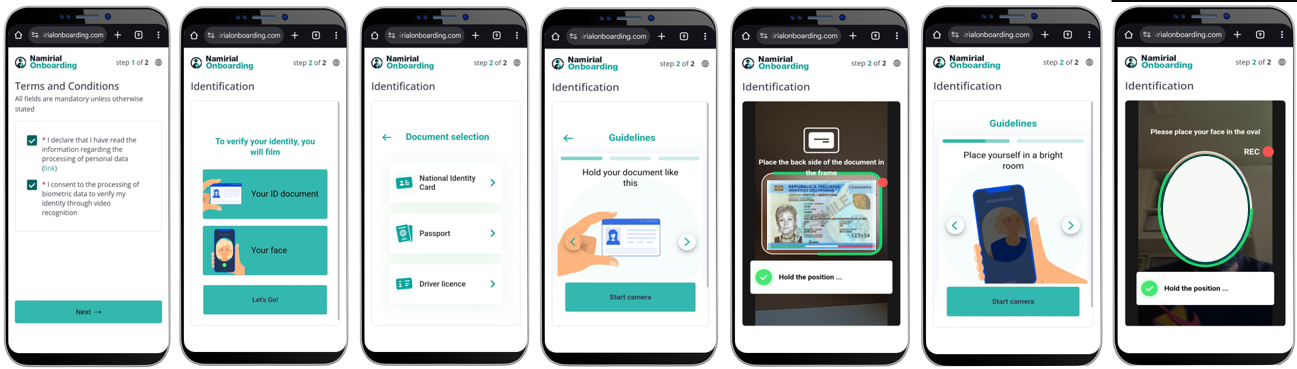
The ID Self onboarding flow combines document verification with biometric facial recognition and liveness detection for comprehensive identity verification.
- Accept Terms & Privacy
- Capture ID document + face
- Extract data; prefill editable forms
- Artifacts are retained as proof; deliver the data to the integrator
Based on the call described in the Create Request documentation, we can define a sample payload that includes all necessary fields for successfully testing an onboarding process. The payload below is for illustrative purposes only. Additional parameters, such as settings.wizardUrlBack, can also be added as described in the documentation.
{
  "requestTypeId": "123e4567-e89b-12d3-a456-426614174000",
  "parameters": {
    "email": "john.doe@mail.com",
    "phoneNumber": "+4300000000"
  }
}
This payload includes the following elements:
requestTypeId: Identifies the entire process for managing recognition methods.parameters: Optional fields that can be prefilled. If there is no issue with a disposable signing certificate, this part can be empty; in this case, we have an anonymous request.
The minimum payload for this type of onboarding is:
{
  "requestTypeId": "123e4567-e89b-12d3-a456-426614174000"
}
Note: To receive notifications about identification, you must set the notification address in the request type.