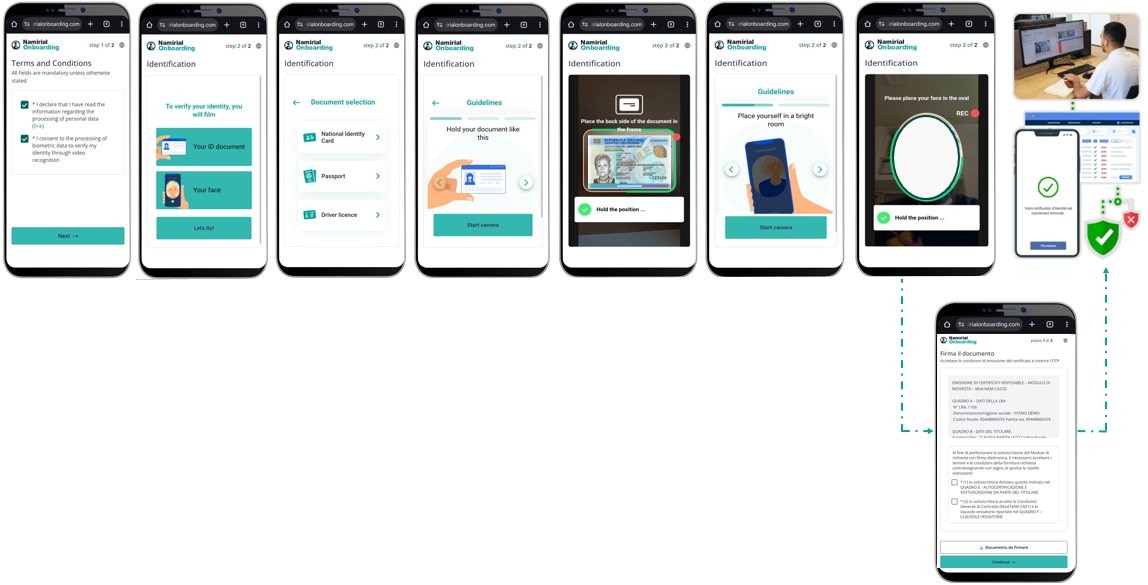
This comprehensive onboarding flow combines identity verification (via eID or ID Self), liveness validation, and Qualified Electronic Signature (QES) for complete legally-binding digital onboarding.
- Accept Terms & Privacy
- Choose recognition: eID or ID Self
- Verify identity:
- eID → provider verifies
- ID Self → doc/biometric checks → Livecheck validates - Documentation
- Prefill forms
- Generate documents; user reviews filled contract
- Sign: QES (possibility of a signature without the use of the OTP)
- Archive & deliver signed documents
Based on the call described in the Create Request documentation, we can define a sample payload that includes all necessary fields for successfully testing an onboarding process. The payload below is for illustrative purposes only. Additional parameters, such as settings.wizardUrlBack, can also be added as described in the documentation.
{
  "requestTypeId": "123e4567-e89b-12d3-a456-426614174000",
  "parameters": {
    "email": "john.doe@mail.com",
    "phoneNumber": "+4300000000"
  }
}
Important: For a workflow with QES, email and phone number are mandatory fields. The payload above represents the minimum required payload.
This payload includes the following elements:
requestTypeId: Identifies the entire process for managing recognition methods.parameters: Contains required fields for QES workflows:email: User's email address (mandatory for QES)phoneNumber: User's phone number (mandatory for QES)
Note: To receive notifications about identification, you must set the notification address in the request type.