smartCMS is designed according to a modular functional architecture, where each subsystem is independent and can be extended or replaced without affecting the rest of the platform.
This section describes in full detail all functional modules as defined in the SmartCMS technical documentation.
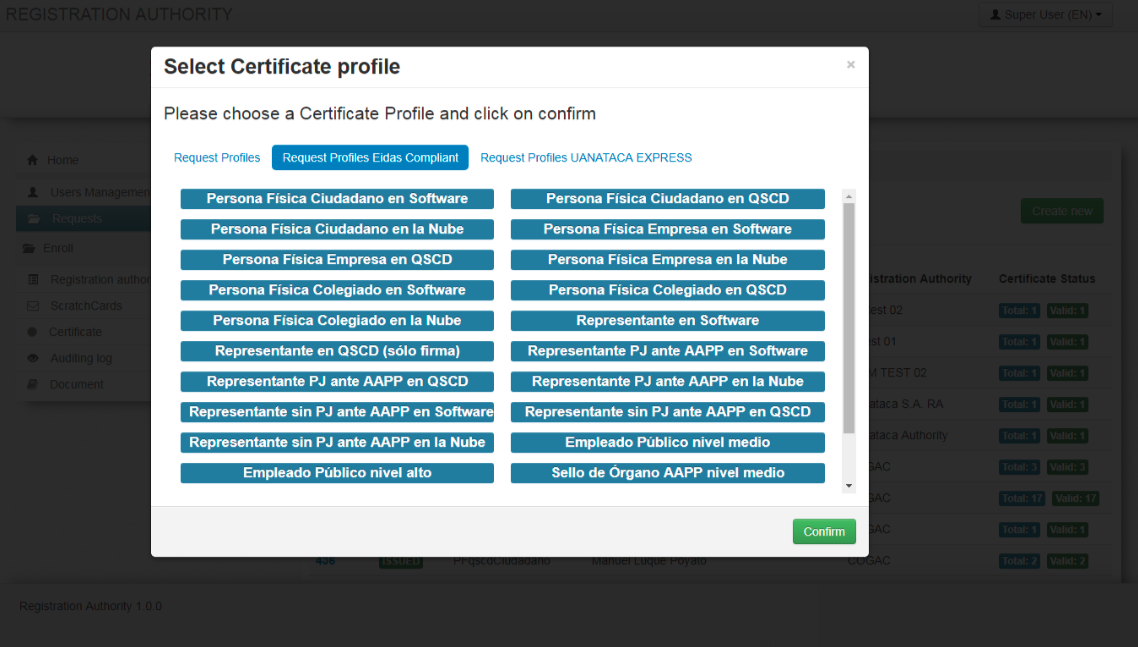
The system is composed of several interoperable subsystems:
- Organizational and hierarchical modeling
- Role‑based access and operator management
- Personal data management
- Authentication mechanisms
- Device lifecycle and customization
- Secret code generation and assignment
- Certificate lifecycle (issuance, suspension, revocation, renewal)
- Auditing and traceability
- Monitoring
- Batch processing
- API integration
Each module can be independently configured and extended.
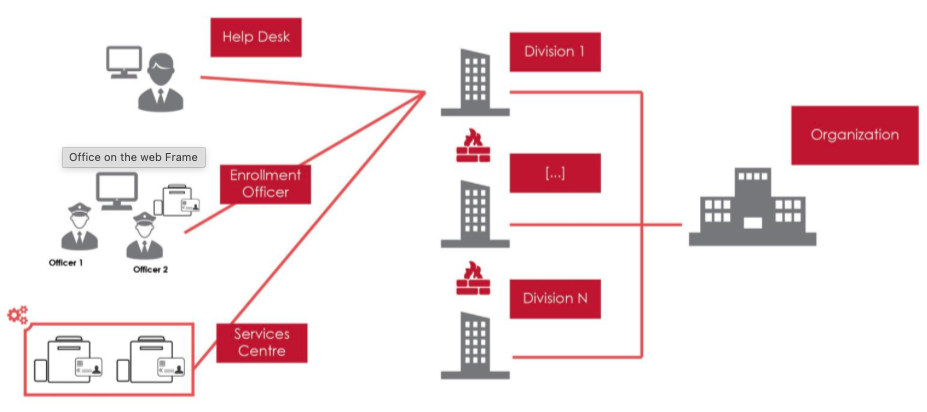
SmartCMS supports complex hierarchical organizations consisting of:
- Organizations
- Divisions
- Registration offices (ROs)
- Operators with specific roles and privileges
- Unlimited number of organizational levels
- Custom visibility rules
- Delegation of privileges by unit
- Assignment of operators to divisions or offices
- Quick activation/deactivation of offices (e.g., temporary onboarding campaigns)
The system enables data visibility policies, ensuring that each operator sees only data relevant to their unit.
Access to SmartCMS requires user authentication. Supported mechanisms include:
- Username & password (internal DB or external LDAP/Directory)
- Strong authentication via digital certificate on smart card or USB token
- Bit4id Single Sign‑On (SSO) mechanisms
The authentication module:
- Controls access to all system functionalities
- Applies high‑security standards
- Can be configured depending on deployment requirements
- Works seamlessly with the UKC (Universal KeyChain)
SmartCMS defines several operational profiles with fine‑grained permissions:
Handles face‑to‑face identity verification, data entry, and device delivery.
RO visibility is limited to the enrollments they personally carried out.
Manages:
- Token personalization
- Certificate download
- Device delivery
- Revocations
- Other RO tasks
They may see all requests within their office (configurable).
Used in centralized issuance flows (Personalization Bureau).
Responsible for:
- Receiving signed paper requests
- Data validation
- Device personalization
- Packaging and shipping of personalized devices
Manages:
- System configuration
- DB connections
- Logging
- Maintenance operations
Executes lifecycle management operations:
- Suspension
- Reactivation
- Revocation
Across all offices.
Accesses the auditing system.
End user. Access is limited to:
- Self‑service portal
- Certificate renewal
- PIN reset
- Token status operations
SmartCMS provides a complete management panel for all operators.
Supported operations:
- Add new operator
- Remove operator
- Renew or deactivate operator access
- Assign default roles and tasks
- Associate operators with divisions/offices
- Import operators in batch (CSV with predefined structure)
This flexibility supports organizations with high turnover or distributed operational models.
One of the most powerful modules in SmartCMS.
- Arbitrary extension of personal data fields
- Custom data types and validation rules
- Integration with external data sources (web services, DB lookups)
- Dynamic recognition of new attributes across:
- UI pages
- Search filters
- Batch processing
- Reporting templates
This module ensures compliance with identification requirements in regulated environments such as eIDAS or national ID systems.
SmartCMS includes a secure subsystem for the complete lifecycle of secret codes, such as:
- PIN
- PUK
- Emergency codes
- Device reset codes
- Generation of secret codes using strong RNG (smart card or HSM)
- Batch creation of scratch cards
- Import/export (CSV, XML, JSON)
- Encrypted storage in DB
- Optional security envelope printing
- Luhn algorithm for human‑error minimization
- Barcode support
- Automatic or manual assignment during device production
Operators may also delegate code production to authorized third‑party centers.
SmartCMS integrates a complete auditing subsystem:
- Separate auditing database
- Tracks every modification to system data
- Captures:
- Timestamp
- Operator ID
- Operation type (Insert, Modify, Delete)
- Pre/post state snapshot
- Fully navigable from UI
- Export to CSV, JSON, and XML
- Digital signature of exported logs (CAdES, PAdES, XAdES) via HSM
This meets regulatory requirements for forensic traceability.
SmartCMS supports end‑to‑end customization of devices (smart cards, tokens).
Customization includes:
- Background images
- Logos
- Personal data printed on device
- Barcode
- User photo
- Preview of print layout in real time
- On‑card key pair generation
- Import of certificate objects
- Secure initialization
- Middleware components loaded via browser (no admin privileges required)
- Populate on‑device data files as per profile definition
- PIN/PUK assignment aligned with scratch‑card batch
Device profiles (templates) are fully configurable.
The enrollment module manages:
- Certificate request creation
- Communication with CA services
- Certificate issuance
- Batch issuance (where CA supports it)
- Suspension
- Reactivation
- Revocation
- Renewal
Supported Italian and international CA interfaces include:
- InfoCert
- PosteCOM
- IT‑Telecom
- Actalis
- Intesa
- ArubaPEC
SmartCMS supports three main provisioning models:
- Device personalized during an operator session
- Certificate downloaded directly onto the device
- Centralized mass production
- Ideal for large campaigns or bureau workflows
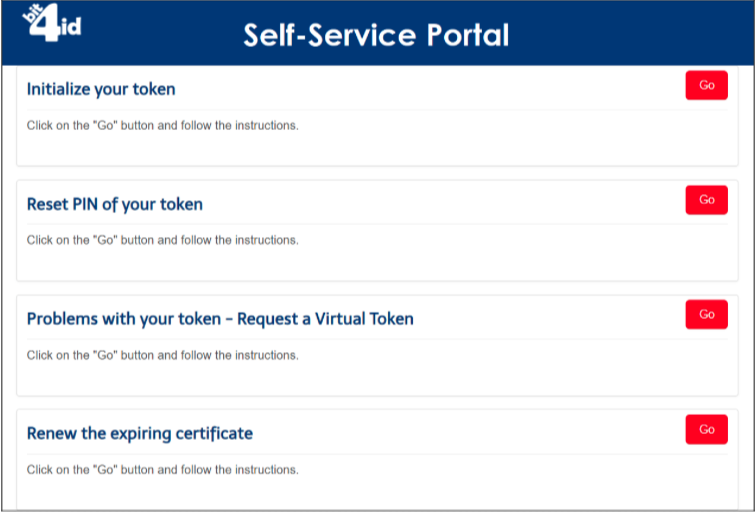
- Device delivered without certificate
- User completes activation via Self‑Service Portal
- PIN reset
- Suspension/reactivation
- Revocation
- Virtual token requests
SmartCMS automatically:
- Detects certificates approaching expiration
- Sends renewal notifications to holders
- Provides a dedicated renewal portal
- Allows automatic replacement of certificates on devices
- Supports payment integration (optional)
- Uses the existing certificate to authenticate the renewal request (signing)
The renewal client application:
- Authenticates user
- Optionally verifies payment
- Generates new keys (if required)
- Obtains new certificates from CA
- Updates device
- Provides renewal confirmation
SmartCMS exposes its internal functionalities via APIs supporting:
JSON over HTTP
REST (HTTP) API endpoints may include:
Requests
Devices
Certificates lifecycle
Offices
Operators
Self‑service
API keys can be assigned to specific client applications with definable privileges.
SmartCMS includes:
- Restart services
- Backup/restore DB
- Log inspection
- Static resource optimization
- Script automation via object model
- DB‑agnostic backup formats
- Cross‑DBMS restoration capability
- Automated or manual import of test data
- Scriptable schema updates
- Forward/backward migrations
- Transactional safety
- Separate profiles for production, staging, testing
- Deploy new versions with zero downtime
- Per‑module verbosity
- Custom log formats
- Syslog or DB destinations
- Integration with Bit4id Smartlog
SmartCMS can monitor:
- Internal services
- External CA services
- System health
- Performance metrics
Monitoring is accessible via both UI and administrative shell.
This module overview shows that SmartCMS provides:
- Complete PKI lifecycle automation
- Fully configurable workflows
- Advanced personalization options
- Secure auditing and monitoring
- A robust API for integration
smartCMS is a mature, powerful, and flexible solution for any scenario requiring secure credential management.