The landing page provides a real-time overview of system status and operational indicators.
After successful authentication, the administrator is redirected to the Landing Page (Dashboard).
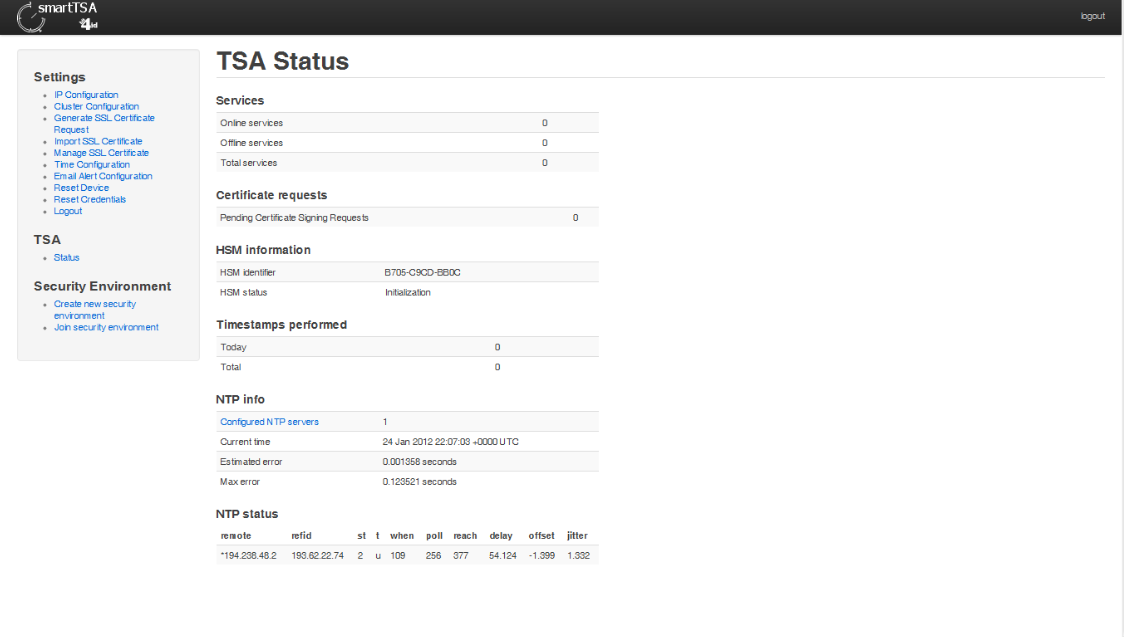
This page provides summarized information about:
- timestamping services (online, offline, total);
- pending certificate request;
- HSM information (identifier and status);
- time stamps performed;
- info about NTP servers (number of NTP servers configured, current time, estimated error and maximum error);
- NTP status.
The content displayed depends on the lifecycle phase of the SmartTSA appliance.
If the Security Environment is not yet initialized, the dashboard:
- Displays basic system information
- Shows limited operational data
- Enables only pre-initialization administrative functions
At this stage, timestamping services are not yet active.
The left-side menu contains only the features available before security initialization.
The central area of the landing page includes the following information panels:
Displays:
- Number of services currently Online
- Number of services currently Offline
- Total configured services
This section provides immediate visibility of service availability.
Displays:
- Number of certificate requests awaiting validation
- Requests generated but not yet assigned a certificate
- Requests pending CA response
This section helps administrators track certificate lifecycle management.
Displays:
- HSM Identifier
- HSM operational status
The HSM (Hardware Security Module) is responsible for:
- Secure key generation
- Key storage
- Cryptographic operations
If the HSM is unavailable, timestamp services cannot operate.
Displays:
- Total number of timestamps issued
- Operational activity indicators
This allows monitoring of system usage and workload.
Displays:
- Number of configured NTP servers
- Current system time
- Estimated synchronization error
- Maximum synchronization error
Time accuracy is critical for timestamping operations.
Indicates:
- Whether synchronization is active
- Whether NTP servers are reachable
- Time deviation conditions
If NTP synchronization fails, timestamping accuracy may be compromised.
The landing page dynamically reflects the lifecycle stage of the SmartTSA:
| Lifecycle Phase | Landing Page Behavior |
|---|---|
| Pre-initialization | Limited functionality |
| Security initialized | Full operational view |
| Active TSA services | Online/Offline service monitoring |
The left-side navigation menu provides access to:
- IP configuration
- Time configuration
- SSL certificate management
- Security Environment initialization
- Certificate request management
- Timestamping service configuration
- Email alerts configuration
The available options depend on system state.
Administrators should periodically verify:
- All required services are online
- No pending certificate requests remain unresolved
- HSM status is operational
- NTP synchronization is active
- No abnormal timestamp activity is detected
Regular monitoring ensures compliance and service reliability.