This guide explains the roles shown in the current user registration form. Use it when you need to decide which roles to assign to a new or existing user.
Available roles and their exact permissions can vary by tenant configuration. Use the descriptions below as operational guidance and confirm sensitive permissions in the target environment.
Roles are assigned when creating or editing a user from Organization > Users.
The current new-user form can show these role toggles:
- Sender
- ReportAdmin
- SiteUser
- BatchSender
- SiteAdmin
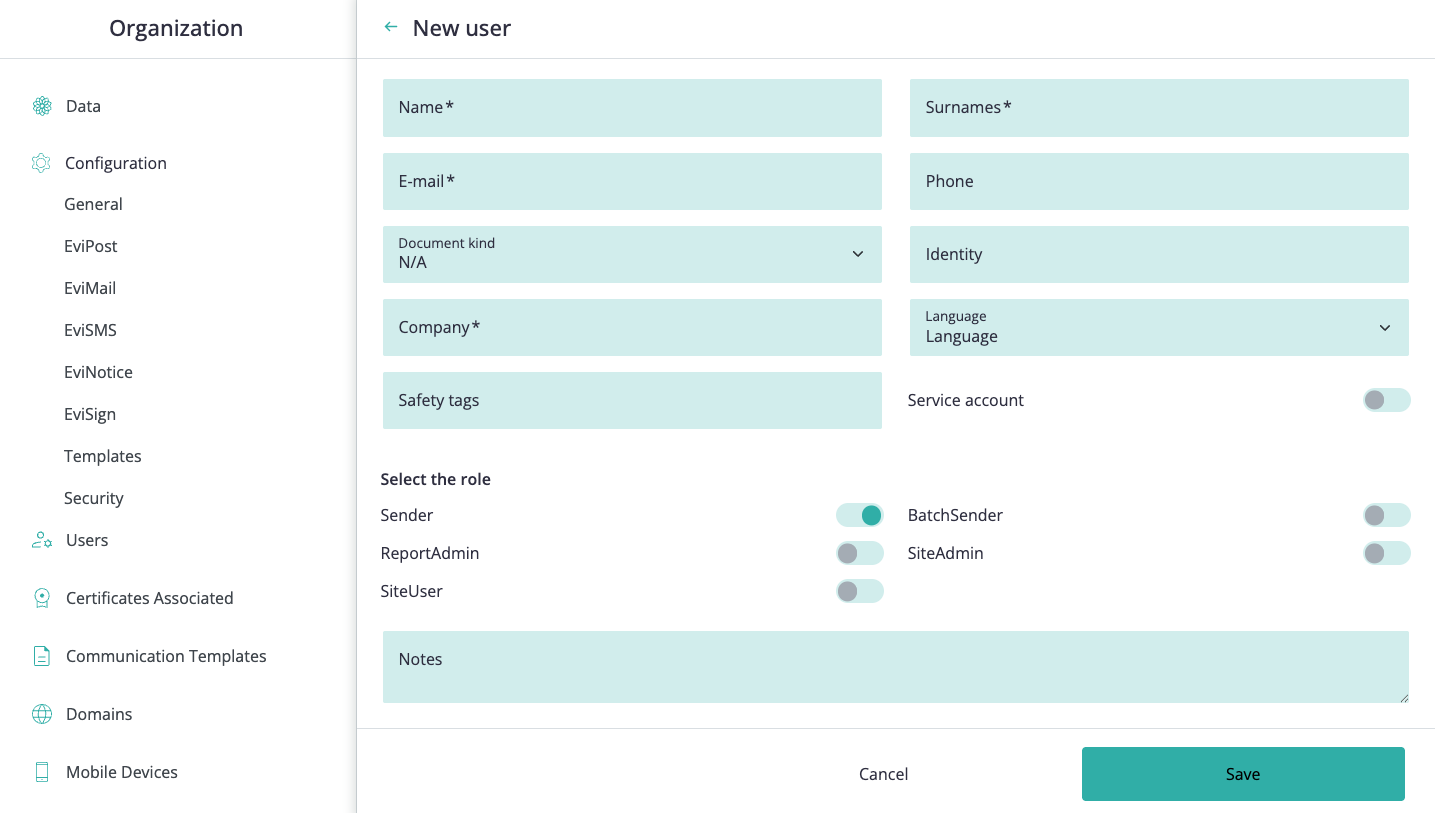
Users can hold more than one role when the operational scope requires it.
Common combinations include:
- Sender with BatchSender for users who need both single-send and batch workflows
- SiteUser with ReportAdmin for users who need to review site data and export reports
- SiteAdmin with ReportAdmin for administrators who also manage reporting
Assign only the minimum combination needed for the user's work.
Use Sender for users who need to create and send individual certified communications from the web interface.
Typical scope:
- can send the services enabled for the site
- can manage their own contacts and evidence
- normally works only with their own submissions and profile information
Use BatchSender for users who need to prepare or send batch submissions.
Typical scope:
- can create batch submissions for the batch-enabled services configured on the site
- can review the batch screens related to those services
Use SiteUser for standard users who need access to the site as a platform user but do not need to issue certified communications themselves.
Typical scope:
- can consult site information and notifications made from the site
- can review contacts and site-level consumption information where available
- does not issue Evi* communications just because the user has this role alone
- can also generate reports if combined with ReportAdmin
Use ReportAdmin for users who need access to reporting or operational report administration, where reporting is enabled.
Typical scope:
- can request and manage exports for their own transactions
- can report on site activity according to the scope exposed by the tenant
- does not automatically grant access to evidence content owned by other users or signers
Use SiteAdmin only for users who need administrative access to organization settings, users, roles, password policies, templates, domains, billing-related views, or other site-level configuration.
Typical scope:
- can manage organization settings and users
- can access site-level administration areas such as billing, consumption, templates, and domains
- can review submissions made by other members of the site
- does not automatically grant access to the signed content or evidence files of other users where ownership restrictions still apply
Before assigning roles, confirm:
- the user has the minimum access needed for their responsibilities
- administrative roles are limited to trusted site administrators
- batch sending is only enabled for users who manage batch workflows
- reporting roles are assigned only when the user needs report access
- service accounts receive only the permissions needed for the integration
- role changes are reviewed when a user changes responsibilities
The user has the operational roles required for their work without unnecessary site-level permissions.